

Coffee is no longer just about taste—it’s about experience. The Evebot EB-Pro Metal Countertop Single Cup Coffee Printer is at the center of this shift, turning ordinary lattes into personalized works of art. Whether you’re running a busy café or experimenting at home, this machine promises to elevate presentation, branding, and customer engagement.
This guide breaks down exactly how the Evebot EB-Pro works, what makes it different from other coffee printers, and whether it’s worth the investment. Expect practical insights, real-world use cases, and tips to get the best results from every cup.
In This Article
The Rise of Coffee Printing: Why the Evebot EB-Pro Is Turning Heads
Walk into a modern specialty café today, and there’s a good chance you’ll see more than latte art hearts and rosettas. Coffee printing—using edible ink to place images, logos, or messages on foam—is quickly becoming a standout feature.
The appeal is simple: customization sells. Customers love seeing their name, a selfie, or a brand logo printed directly on their drink. Social media has only amplified this trend, turning every cup into shareable content.
The Evebot EB-Pro Metal Countertop Single Cup Coffee Printer stands out because it’s built for serious use—not just novelty. With a durable metal design and faster output, it’s aimed at businesses that want to integrate coffee printing into daily operations, not just occasional gimmicks.
Key trend insight: Cafés using coffee printers often see increased customer engagement and higher perceived value per cup, especially in tourist-heavy or event-driven locations.
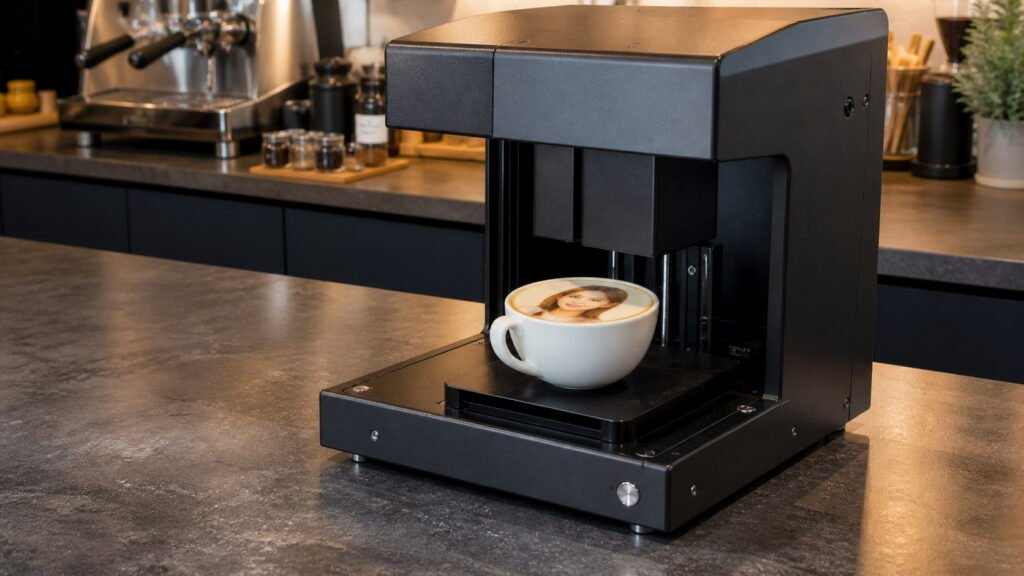
What Is the Evebot EB-Pro Metal Countertop Single Cup Coffee Printer?
At its core, the Evebot EB-Pro Metal Countertop Single Cup Coffee Printer is a specialized device that prints high-resolution images onto the foam surface of drinks using food-safe ink.
Instead of manually pouring latte art, you upload or select a design, position your cup, and let the printer handle the rest. Within seconds, a detailed image appears on the foam.
Who is it designed for?
This machine isn’t limited to one type of user. It fits multiple scenarios:
- Cafés and coffee shops looking to differentiate their menu
- Restaurants and hotels aiming to elevate presentation
- Event organizers creating memorable guest experiences
- Marketing teams running branded campaigns
- Home enthusiasts who want next-level coffee creativity
What can it print on?
The EB-Pro works best on drinks with stable foam surfaces, including:
- Lattes and cappuccinos
- Flat whites with microfoam
- Hot chocolate
- Beer (on foam head)
- Milk-based beverages
Important: Foam quality directly affects print clarity. Dense, fine microfoam delivers the sharpest results.
Key Features of the Evebot EB-Pro Coffee Printer That Actually Matter
Not all coffee printers are created equal. The Evebot EB-Pro Metal Countertop Single Cup Coffee Printer includes several features that make a real difference in daily use.
High-resolution edible printing
The EB-Pro produces detailed, photo-like prints using food-grade ink. This isn’t just novelty text—logos, portraits, and intricate designs come out crisp when the foam is properly prepared.
Durable metal countertop design
Unlike plastic-heavy entry-level models, the EB-Pro uses a metal construction that holds up better in high-volume environments. It’s designed for cafés where durability matters.
Wide drink compatibility
You’re not limited to coffee. The printer works across various foam-topped beverages, giving flexibility for menus and creative offerings.
App-based design control
Uploading images is simple through a connected app. You can:
- Select preloaded templates
- Upload custom images or logos
- Adjust size and positioning before printing
This makes it easy to switch between designs quickly during service.
Fast single-cup printing
Speed matters in a café. The EB-Pro is optimized for quick turnaround per cup, making it viable even during moderate rush periods.
Evebot EB-Pro Metal Countertop Single Cup Coffee Printer: Specs Breakdown
Understanding the technical side of the Evebot EB-Pro Metal Countertop Single Cup Coffee Printer helps you judge whether it fits your workflow—especially in a busy café environment.
Core specifications at a glance
| Feature | Details |
| Build | Metal countertop body |
| Printing method | Edible inkjet (food-safe) |
| Print surface | Foam-based drinks (latte, cappuccino, etc.) |
| Connectivity | App-based (typically via Wi-Fi) |
| Print time | ~10–20 seconds per cup |
| Resolution | High-resolution image output |
| Cartridge type | Replaceable edible ink cartridge |
Ink cartridge details
The EB-Pro uses food-grade edible ink, designed specifically for beverages. Each cartridge supports multiple prints depending on image density.
- Light text prints → more cups per cartridge
- Full-image prints → fewer cups per cartridge
- Shelf life matters—store cartridges properly to avoid waste
Practical tip: Keep a backup cartridge during peak hours. Running out mid-service disrupts flow more than you’d expect.
Setup and space requirements
The metal countertop design makes it stable but also means you’ll need a dedicated space:
- Flat, vibration-free surface
- Access to power and Wi-Fi
- Enough clearance for cup placement and operation
It’s compact enough for most café counters but not something you’ll want to move frequently.
File formats and customization
The printer supports common image formats, allowing flexibility:
- JPEG / PNG images
- Logo files for branding
- Text-based designs via the app
Best practice: Use high-contrast images with clean edges. Overly complex or low-resolution designs tend to blur on foam.
How the Evebot EB-Pro Works (Step-by-Step Walkthrough)
Using the Evebot EB-Pro Metal Countertop Single Cup Coffee Printer is straightforward, but the quality of your output depends heavily on technique—especially foam preparation.
Step 1: Prepare the drink surface
The most critical step.
- Steam milk to create fine microfoam (smooth, glossy texture)
- Avoid large bubbles—they distort the printed image
- Keep the surface level and stable
Barista insight: Foam consistency matters more than the printer itself. Even the best machine can’t fix poor milk texture.
Step 2: Position the cup correctly
Place the cup under the printer head:
- Center the cup for accurate alignment
- Ensure the surface is close enough to the print head
- Avoid movement during printing
Step 3: Upload or select your design
Using the companion app:
- Choose a preloaded template or upload an image
- Adjust size, brightness, and placement
- Preview before printing
Tip: Slightly increase contrast to improve visibility on milk foam.
Step 4: Start printing
Once everything is aligned:
- Tap print
- The machine applies edible ink onto the foam
- Printing typically finishes within seconds
Step 5: Serve immediately
Printed designs look best right after printing.
- Foam begins to settle over time
- Delays can reduce sharpness
Quick win: Serve within 30–60 seconds for maximum visual impact—especially for photos and social sharing.
Real-World Use Cases: Who Should Buy the Evebot EB-Pro?
The Evebot EB-Pro Metal Countertop Single Cup Coffee Printer isn’t just a gadget—it’s a tool that can change how you present and sell coffee.
Coffee shops aiming to stand out
Independent cafés can use the EB-Pro to:
- Print logos on every cup
- Offer personalized drinks at a premium price
- Create Instagram-worthy moments
Result: Higher perceived value and stronger brand identity.
Event planners and catering services
Weddings, corporate events, and private parties benefit from customization:
- Guest names printed on drinks
- Event logos or themes
- Interactive drink stations
It turns coffee into part of the entertainment.
Marketing and brand activations
Brands use coffee printers for experiential campaigns:
- Product launches
- Trade shows
- Pop-up cafés
A printed drink becomes a shareable marketing asset, especially when tied to social media.
Restaurants and hotels
Upscale venues can elevate presentation:
- Signature drinks with branded designs
- Personalized guest experiences
- Premium service differentiation
Home users and coffee enthusiasts
While less common, some enthusiasts invest for:
- Creative expression
- Hosting unique gatherings
- Experimenting beyond traditional latte art
Reality check: The EB-Pro shines most in commercial settings, where its cost can be offset by increased revenue or brand exposure.
Evebot EB-Pro vs Other Coffee Printers: Is It Worth the Upgrade?
Not every café needs a high-end machine. The real question is whether the Evebot EB-Pro Metal Countertop Single Cup Coffee Printer delivers enough value compared to entry-level options.
Build quality and durability
Entry-level coffee printers often rely on plastic components, which can wear down in busy environments. The EB-Pro’s metal construction gives it an edge in long-term durability.
- Better suited for daily commercial use
- More stable during operation (less vibration = cleaner prints)
- Lower risk of breakdown under consistent demand
Print quality and consistency
Cheaper models can produce decent prints, but consistency is where they struggle.
- EB-Pro → sharper images, better contrast, more reliable output
- Entry-level → more variation depending on foam and calibration
Key difference: The EB-Pro handles repeated use without significant drop in print quality.
Speed and workflow impact
Speed becomes critical during peak hours.
- EB-Pro → optimized for fast single-cup turnaround
- Budget printers → slower processing and occasional lag
In a real café setting, even a few seconds saved per cup adds up quickly.
Software and usability
The app experience can make or break daily usability.
- EB-Pro → smoother interface, quicker image uploads
- Lower-end models → limited templates, slower response
Price vs performance
| Factor | Evebot EB-Pro | Entry-Level Printer |
| Price | Higher upfront | Lower upfront |
| Durability | High (metal build) | Moderate |
| Print quality | Consistent, sharp | Variable |
| Speed | Faster | Slower |
| Best for | Cafés & events | Casual or low-volume use |
Verdict: If you’re running a business or planning frequent use, the EB-Pro justifies its cost. For occasional novelty use, a cheaper model might be enough—but don’t expect the same reliability.
Pros and Cons of the Evebot EB-Pro Coffee Printer
No machine is perfect. The Evebot EB-Pro Metal Countertop Single Cup Coffee Printer delivers strong performance, but it comes with trade-offs.
Pros
- Creates a premium customer experience
Personalized drinks instantly feel more valuable and memorable - Powerful branding tool
Logos, messages, and visuals reinforce brand identity with every cup - High customization flexibility
Switch designs on demand—ideal for promotions and events - Durable construction
Built for commercial environments, not just occasional use - Social media appeal
Printed drinks are highly shareable, driving organic exposure
Cons
- Higher initial investment
Not ideal if you’re testing the concept on a tight budget - Ongoing ink costs
Edible ink cartridges add to operational expenses - Dependent on foam quality
Poor milk texture leads to blurry or uneven prints - Adds a step to workflow
Even fast printing still requires coordination during busy service
Reality check: The EB-Pro isn’t just a tool—it’s a strategy. It works best when integrated into your menu, pricing, and customer experience.
Cost Breakdown: Is the Evebot EB-Pro a Smart Investment?
Before buying the Evebot EB-Pro Metal Countertop Single Cup Coffee Printer, it’s worth looking beyond the price tag and focusing on return potential.
Upfront cost vs long-term value
The EB-Pro sits in the premium category. That means:
- Higher initial investment
- Lower risk of replacement or frequent repairs
- Better suitability for long-term use
For a café, this isn’t just equipment—it’s a revenue-generating feature.
Cost per print estimate
Your cost per cup depends on ink usage:
- Simple text/logo → lower ink consumption
- Full-image prints → higher ink usage
Typical factors affecting cost:
- Image complexity
- Print frequency
- Cartridge efficiency
Smart move: Use simpler designs for everyday service and reserve full-image prints for premium offerings.
Pricing strategy for printed drinks
Many cafés successfully charge extra for printed coffee:
- Base drink price + premium for customization
- Tiered pricing (text vs photo prints)
- Bundled offers (events, group orders)
Even a small markup per cup can offset costs quickly in high-traffic locations.
ROI potential in real scenarios
The EB-Pro performs best when:
- Foot traffic is steady
- Customers are experience-driven (tourists, younger audiences)
- Social media sharing is encouraged
Example ROI logic:
- Add $1–$2 per printed drink
- Sell 50–100 printed cups daily
- Cover operational costs while increasing profit margins
Hidden value: marketing impact
Not all returns are direct.
- Customers share photos online
- Your brand appears in user-generated content
- Repeat visits increase due to novelty
Bottom line: The Evebot EB-Pro becomes a smart investment when used intentionally—not just as a novelty, but as part of your branding and pricing strategy.
Tips to Get the Best Results from Your Evebot EB-Pro
Getting consistent, eye-catching prints from the Evebot EB-Pro Metal Countertop Single Cup Coffee Printer comes down to technique. The machine does the printing—but you control the canvas.
Nail your milk frothing technique
Foam quality is everything.
- Aim for microfoam with a smooth, glossy texture
- Eliminate large bubbles by tapping and swirling the pitcher
- Keep foam thickness consistent across drinks
Pro tip: Whole milk tends to produce the most stable foam, while alternative milks may require extra practice.
Choose the right drinks
Not every beverage works equally well.
- Best: lattes, cappuccinos, flat whites
- Good: hot chocolate, matcha lattes
- Experimental: beer foam (surprisingly effective)
Drinks with dense, even foam surfaces produce sharper prints.
Optimize your images
The design you choose directly impacts the final result.
- Use high-contrast images (dark elements print better)
- Avoid overly detailed or low-resolution graphics
- Center the subject for better alignment
Quick win: Bold logos and simple graphics often look better than complex photos.
Serve fast for maximum impact
Printed foam changes over time.
- Serve within 30–60 seconds after printing
- Avoid letting drinks sit under heat lamps
- Present the cup immediately for photos
Keep the machine clean
Consistent output depends on maintenance.
- Wipe the print area regularly
- Run cleaning cycles as recommended
- Prevent ink buildup on the nozzle
Key takeaway: Great prints are a combination of barista skill + smart design choices + proper timing.
Common Mistakes to Avoid When Using a Coffee Printer
Even with a high-end machine like the Evebot EB-Pro Metal Countertop Single Cup Coffee Printer, small mistakes can ruin the final result.
Poor foam texture
Large bubbles or thin foam lead to:
- Blurry images
- Uneven ink absorption
- Distorted designs
Fix: Focus on consistent microfoam before anything else.
Low-quality or poorly formatted images
Uploading random images rarely works.
- Low resolution = pixelated prints
- Busy backgrounds = unclear results
Fix: Use clean, high-resolution visuals with strong contrast.
Misaligned cup placement
Positioning matters more than most expect.
- Off-center cups → cut-off designs
- Tilted surfaces → distorted prints
Fix: Take an extra second to align properly before printing.
Overusing edible ink
Heavier prints don’t always mean better results.
- Excess ink can bleed into foam
- Designs lose definition
Fix: Adjust brightness and density in the app.
Skipping regular maintenance
Neglect leads to:
- Clogged nozzles
- Faded or inconsistent prints
Fix: Follow a simple cleaning routine—especially in high-volume settings.
Maintenance, Cleaning, and Ink Management
Keeping your Evebot EB-Pro Metal Countertop Single Cup Coffee Printer in top condition ensures consistent performance and extends its lifespan.
Daily cleaning habits
At the end of each day:
- Wipe down the exterior and print area
- Remove any milk splashes or residue
- Check for ink buildup
Routine maintenance
On a regular schedule:
- Run automatic cleaning cycles
- Inspect the print head for clogs
- Test print quality before service hours
Ink cartridge management
Proper handling makes a big difference.
- Store cartridges in a cool, dry place
- Avoid exposure to heat or direct sunlight
- Replace cartridges before they run completely dry
Tip: Track usage to avoid unexpected downtime during peak hours.
Troubleshooting basics
Common issues and quick fixes:
- Faded prints → check ink levels or clean nozzle
- Misaligned images → recalibrate positioning
- Slow performance → restart system or check connectivity
Consistency comes from care. Treat the machine like any other essential café equipment.
Creative Ideas: How to Use the Evebot EB-Pro for Branding & Marketing
The Evebot EB-Pro Metal Countertop Single Cup Coffee Printer becomes far more valuable when used creatively.
Turn every cup into a brand asset
- Print your café logo on every drink
- Reinforce brand identity visually
- Create a signature look customers remember
Personalize the customer experience
- Add names or short messages
- Celebrate birthdays or special occasions
- Offer custom prints as a premium add-on
Seasonal and themed campaigns
- Holiday designs (Christmas, Ramadan, New Year)
- Limited-time artwork for promotions
- Collaborations with local artists
Boost social media engagement
Encourage customers to share their drinks:
- Create a branded hashtag
- Offer discounts for tagged posts
- Design visually striking templates
Event and corporate opportunities
- Partner with brands for activations
- Offer on-site printing at events
- Create interactive coffee experiences
Big picture: The EB-Pro isn’t just about coffee—it’s about attention, engagement, and memorability.
Frequently Asked Questions About the Evebot EB-Pro Coffee Printer
How long does one print take?
Most prints take around 10–20 seconds, depending on the complexity of the image.
Is the ink used in the Evebot EB-Pro safe to consume?
Yes, the printer uses food-grade edible ink designed specifically for beverages.
Can the Evebot EB-Pro print on cold drinks?
It works best on foam surfaces. Cold drinks can work if they have stable foam, but results may vary.
How many cups can one ink cartridge print?
It depends on the design. Simple text prints last longer, while full-image prints consume more ink.
Does the Evebot EB-Pro require Wi-Fi?
Yes, most setups rely on app connectivity via Wi-Fi for uploading and controlling designs.
What kind of milk produces the best printing surface?
Whole milk typically creates the most stable microfoam, though barista-grade plant milks can also work with proper technique.
Does coffee temperature affect print quality?
Yes. Extremely hot surfaces can break down foam faster, so balanced temperature helps maintain image clarity.
For deeper insight into beverage quality and foam standards, you can explore guidelines from the Specialty Coffee Association: https://sca.coffee
The Evebot EB-Pro Metal Countertop Single Cup Coffee Printer opens up a new layer of creativity in coffee service—one that blends visual appeal with customer experience. If you’re looking to stand out, increase perceived value, and turn every cup into something worth sharing, this machine is more than a novelty—it’s a competitive advantage.
Start experimenting with designs, refine your foam technique, and turn your everyday drinks into something people can’t stop talking about.

Meet Suzee Amelia, the creative voice behind this space—a blog dedicated to exploring coffee culture, lifestyle insights, and everyday inspiration. With a passion for discovering rich flavors and sharing practical tips, Sophie Langford brings a thoughtful and engaging approach to every post.
